
I have the biggest love-hate relationship with my FSA and HSA. On one hand, I love using my pre-tax dollars to purchase items, particularly my beauty items. On the other hand, my benefits provider (HealthEquity and/or EZReceipts) is extremely strict in what they reimburse.
I’ve had my sunscreen purchases get rejected time and time again. But nevertheless, I persisted. And I got them approved.
So please learn from my battles so that you can successfully get your FSA/HSA claims approved for your eligible products. In this blog, I’ll share the tips I’ve gathered for FSA/HSA approvals. Please note: I am not an FSA/HSA/tax/finance professional, so these tips are all based in personal experience. And I am not liable for any guidance given here, as your mileage may vary. It’s merely a case study.
What to Purchase: FSA/HSA-Eligible Items
I’ve only had an FSA for about 5 years and an HSA for 2 (thank you to my corporate employers). But in my limited time, I’ve come to learn that the FSA and HSA-eligible items are pretty much overlapping. So you normally will see them advertised in conjunction.
What type of FSA account do you have?
The complicated part about FSA and HSAs is when you have an HSA, you normally are not eligible for an FSA. At least not a full-purpose FSA. My current healthcare plan is a high-deductible health plan with an HSA and (if you opt for it) a limited-purpose FSA (LPFSA).
The LPFSA can pretty much only be used on dental and vision care, not on anything related to medical care. I think the intention here is to use the HSA for all health-related expenses and then the FSA covers things beyond that. But I’ve been saving my HSA to just invest tax-free (because TikTok told me so, of course!).
Once you hit your medical insurance’s deductible, you can submit a form to your FSA benefits provider, stating that you’ve hit your deductible. Once they accept the form, they turn your LPFSA into a full-purpose FSA. And once that happens, you can use your FSA for healthcare expenses (AKA your Sephora purchases).
Popular FSA-eligible purchases
I’ve drafted a blog on how to spend pre-tax/tax-free dollars at Sephora to hit rouge, so check that out for a whole list of products. In short, the main buckets are SPF that’s above SPF 15, hand sanitizers (those fun Touchland ones!), and acne products. Here’s a list of products I suggested:
Inkey List pimple patches
Peace Out pimple patches
Blush: Ciele flush & protect SPF 45 or Nudestix Nudescreen SPF 30
Contour or bronzer: Ciele sculpt & protect SPF 30 (blog on why I love this)
Complexion: Saie Slip Tint SPF 35 or Tower28 SunnyDays SPF 30 or Ilia Super Serum SPF 40
Lip: Tatcha Kissu Lip Tint SPF 25 or Jack Black Lip Balm SPF 25 (untinted)
Setting powder: Supergoop (Re)setting Powder SPF 35
And while you can use your FSA card directly at Amazon, some people opt to purchase with personal credit cards and get reimbursed to get the points from the purchase. And if your claims get rejected from that, this set of tips will still help whether it’s from Amazon or Sephora (or any other retailer).
Why Your FSA Reimbursements Get Rejected
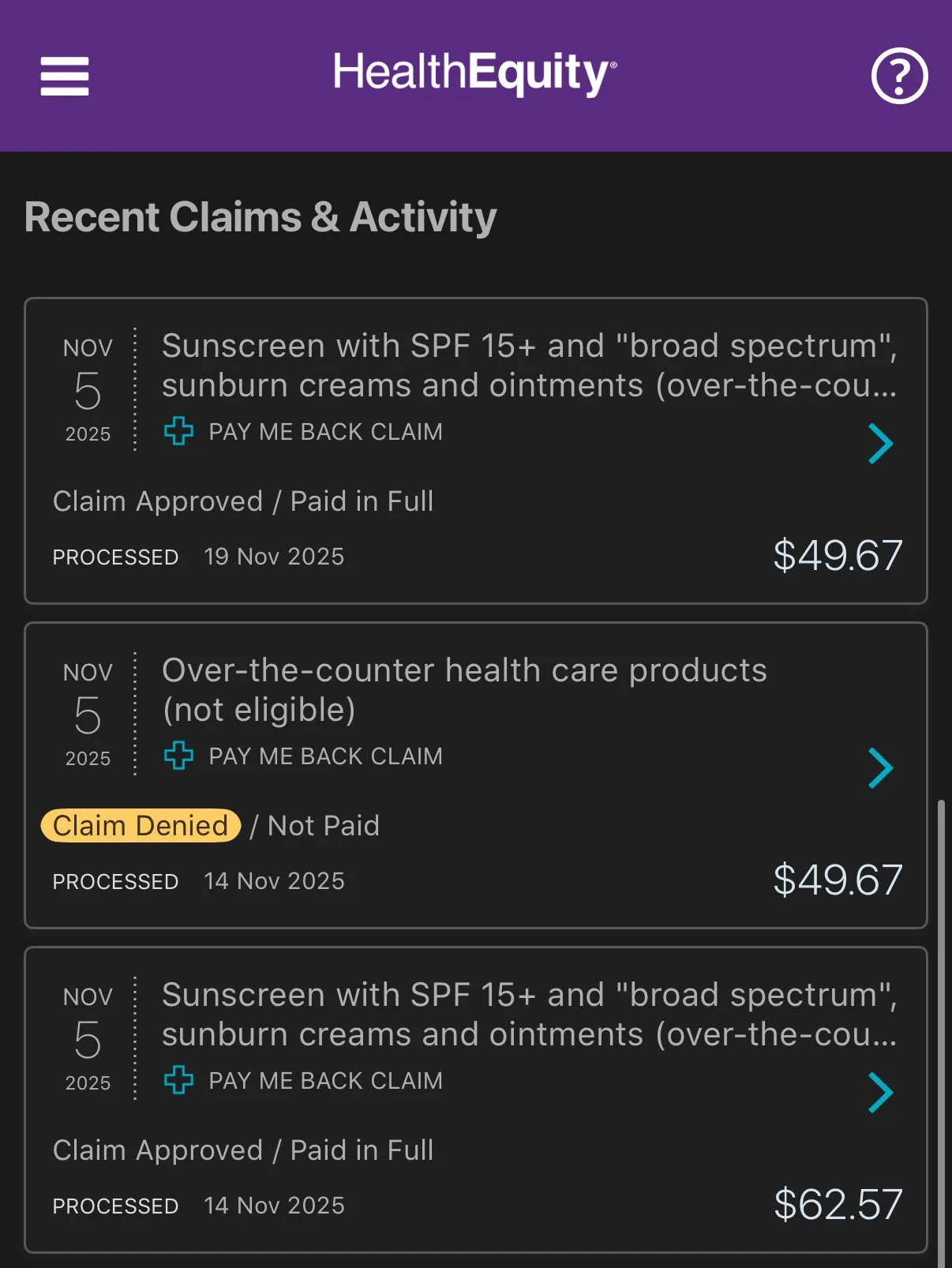
I’ve submitted receipts for reimbursement of different sunscreen formats: traditional lotions and creams, sprays, blush, foundation, lip products (balms, lipstick, gloss), highlighter, and probably more. The ones that go through 99.9% of the time without any pushback are the lotions, cream, and spray SPF. I’ve unfortunately had my Murad Superactive Brightening SPF50 and Mattifying SPF50 rejected before though, which are both a traditional lotion format.
Where I get the most rejections are the color cosmetics. I’ve been told they are not FSA-eligible because they’re “dermatology treatments and products,” “over-the-counter health care products (not eligible),” or that it needs a doctor’s note/letter of medical necessity.
And most of the time, I think it’s because the HealthEquity/EZReceipts personnel are not actually reading the product line items on the receipt to see if it is SPF. They read that it’s a cosmetic product or a lotion but they overlook the “SPF” part listed in the name. And yes, these all are above SPF15 because anything below SPF15 is not FSA eligible.
Another thing I do to make the reimbursement process as painless as possible: I purchase only one type of FSA-eligible item per transaction. So I do one shopping cart/receipt of just sunscreen. Then I do another shopping cart/receipt of just hand sanitizer. That way, when you’re listing them out on your expense reimbursement request, it is clear what they are reimbursing and they don’t get bogged down in the details.
How to Get a Rejected FSA Claim Reimbursed
After confirming that your purchase is actually eligible for FSA reimbursement, my recommendations are as follows:
Get clear pictures of your receipt
This is the foundation of everything, so make sure that each line item is actually legible so the person knows your bought sunscreen.
Take screenshots of the product detail page (PDP) either on Sephora or the brand website
When you’re grabbing the screenshots, make sure you look for keywords such as SPF, sunscreen, and sun protection. In order for a product to make these claims, they have to use active ingredients, which are FDA-approved for sun protection.
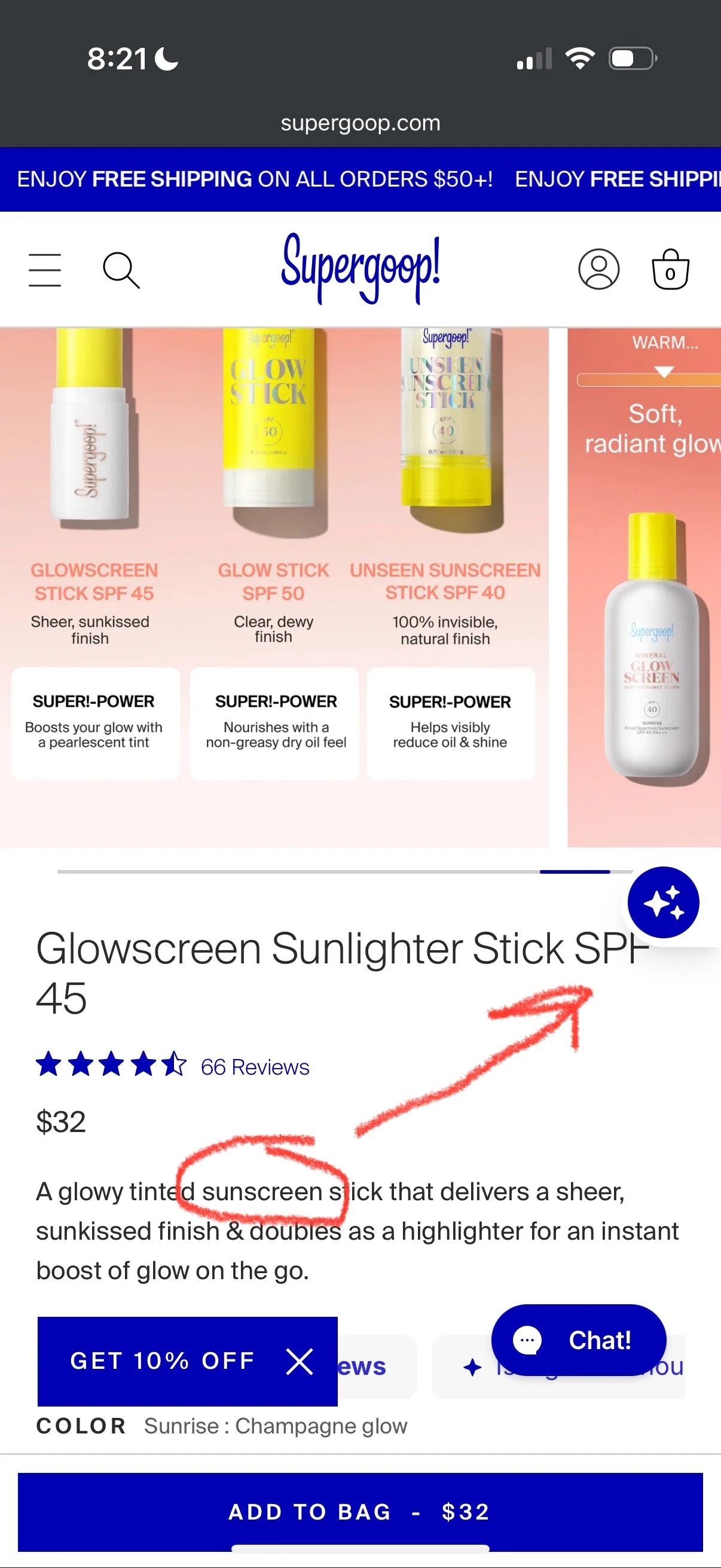
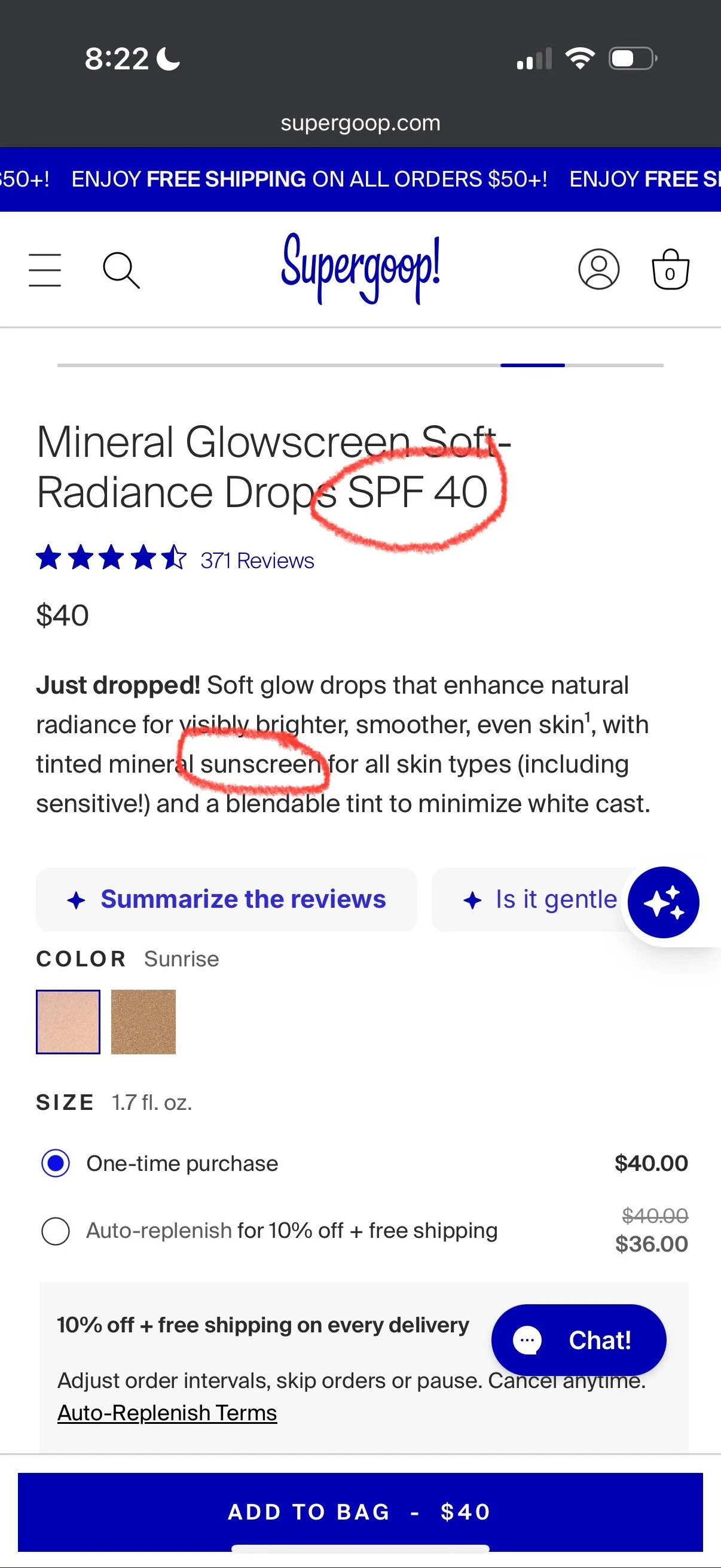
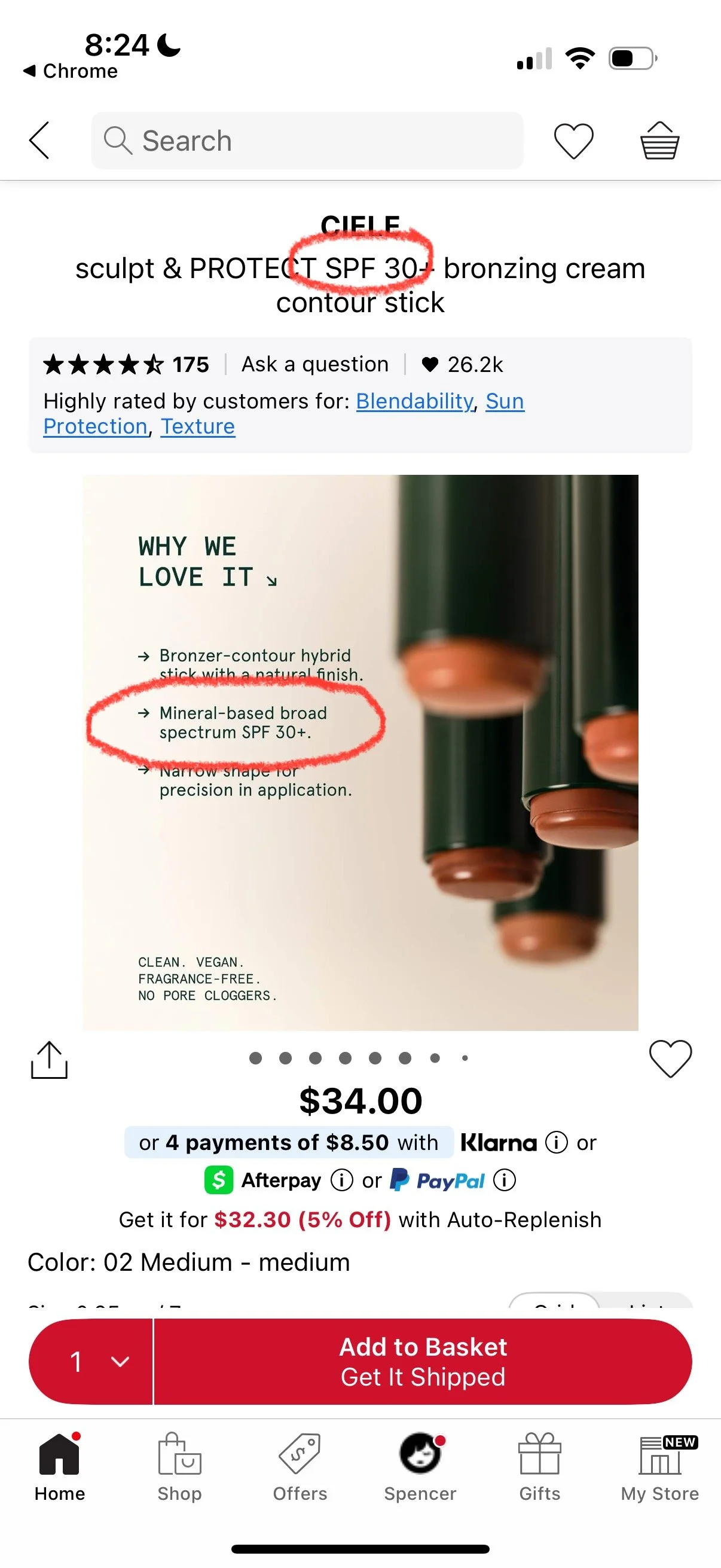
Circle or highlight the words “SPF” and “Sunscreen” on the PDP screenshot
We’re now working under the assumption that the FSA benefits provider is not reading the line items of the receipt, so you need to make it as clear as possible that the specific product you purchased is actually sunscreen and SPF. So circle it so they see it and can immediately get it.
Take photos of your actual product
On each of the products, they list the SPF number and they also say broad-spectrum sunscreen. It’s usually in the front of the packaging box. Take a picture of that.
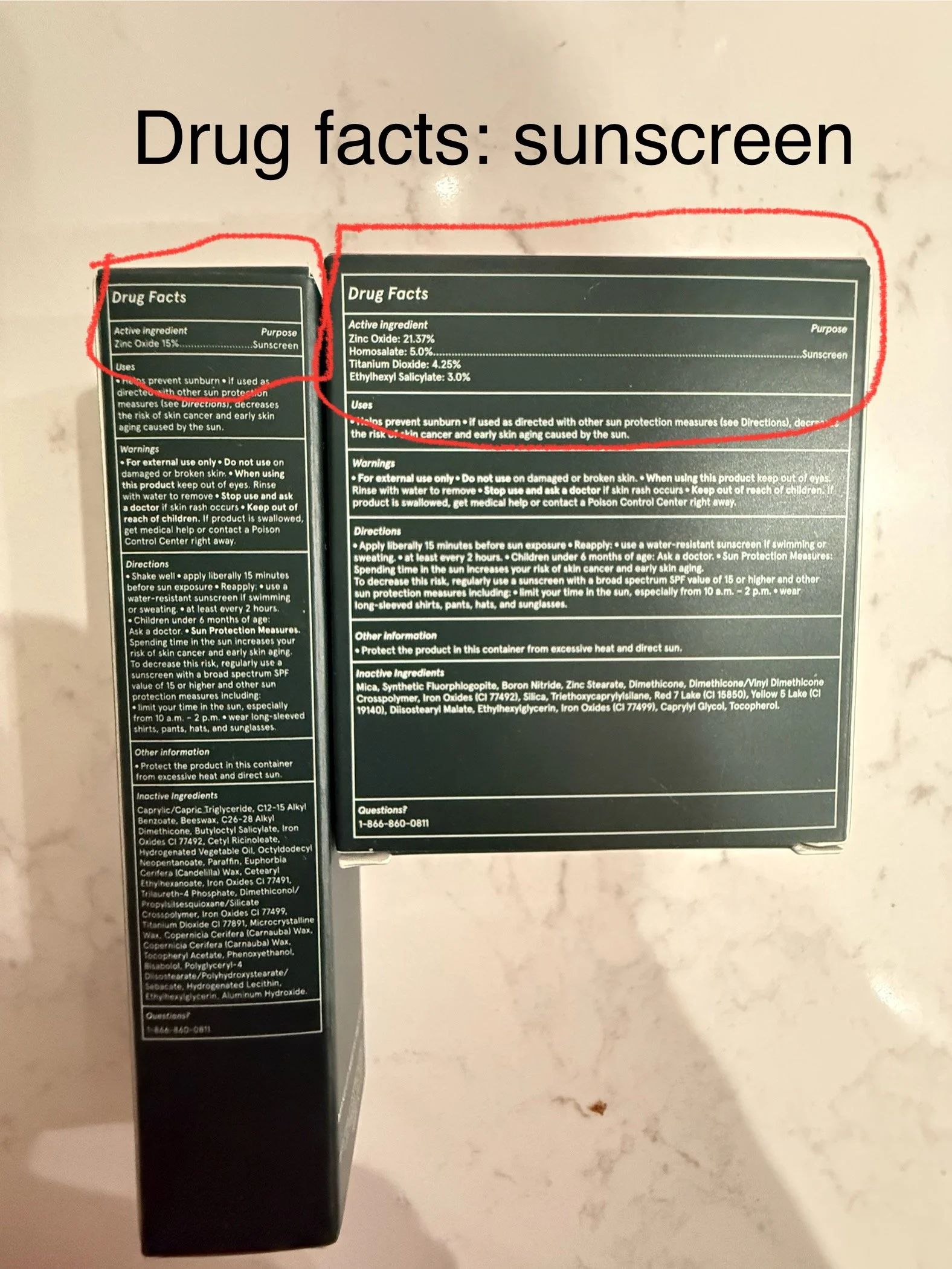
Also take a picture of the ingredients list because sunscreens are FDA-regulated products with active ingredients. Because of that, they have to list out the actives (zinc oxide, titanium dioxide, avobenzone, octinoxate, etc). When they list that in the actives box, it also says the word “sunscreen” as the function of the ingredient. Make sure this word is fully legible.
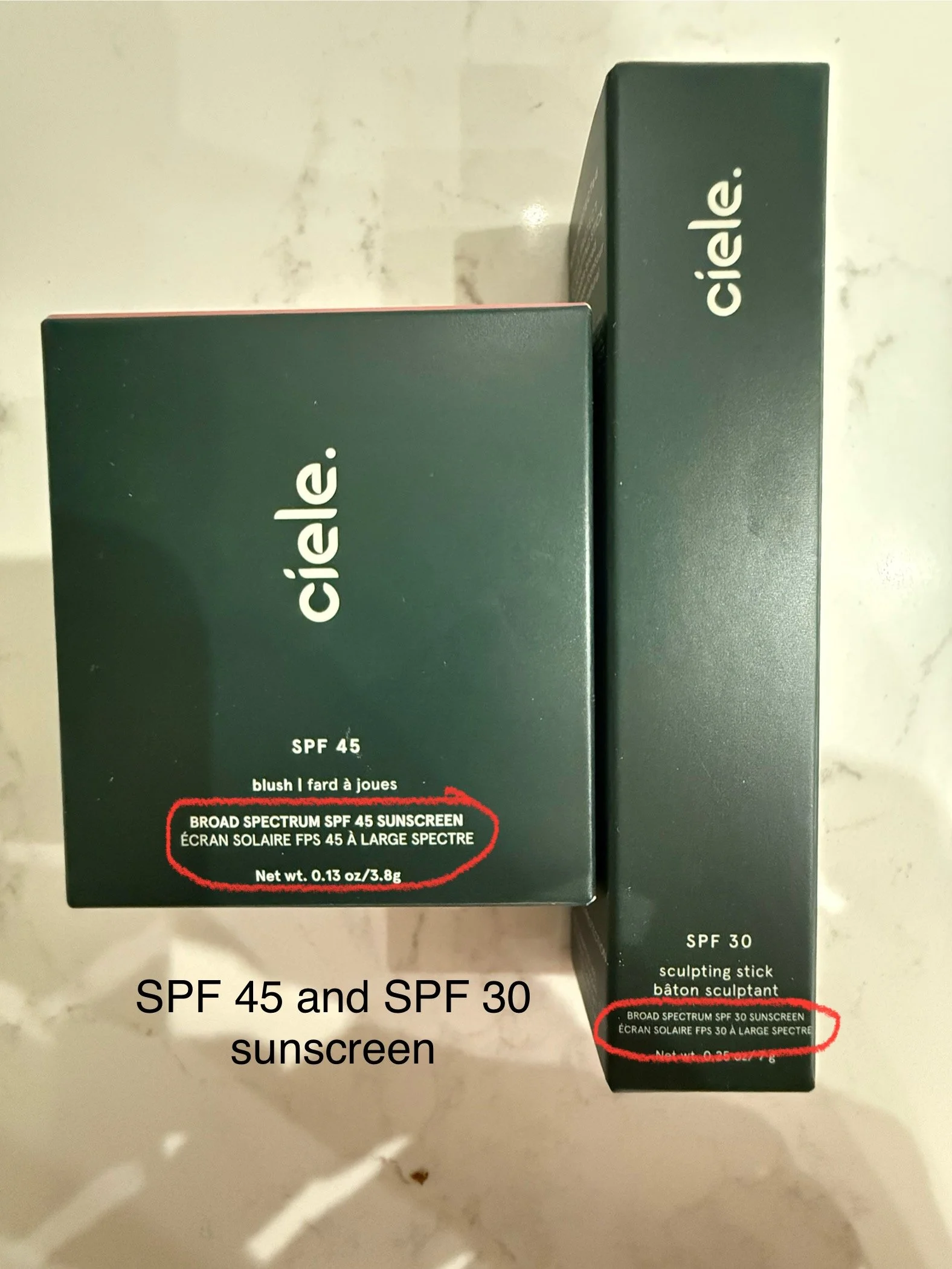
Circle the words “broad-spectrum sunscreen” and “SPF”
Again, we are going to make it 10000% crystal clear to the benefits provider that your product is SPF and therefore eligible for FSA reimbursement.
Submit the “receipts” again
If your benefits provider allows you to submit the receipts back to the same denied claim, perfect. Attach these photos and screenshots as your receipts.
If your benefits provider denies your claim and forces you to open a new claim, attach the original receipt again along with all of these new photos and screenshots as receipts.
What to Do with Partially Reimbursed FSA Claims
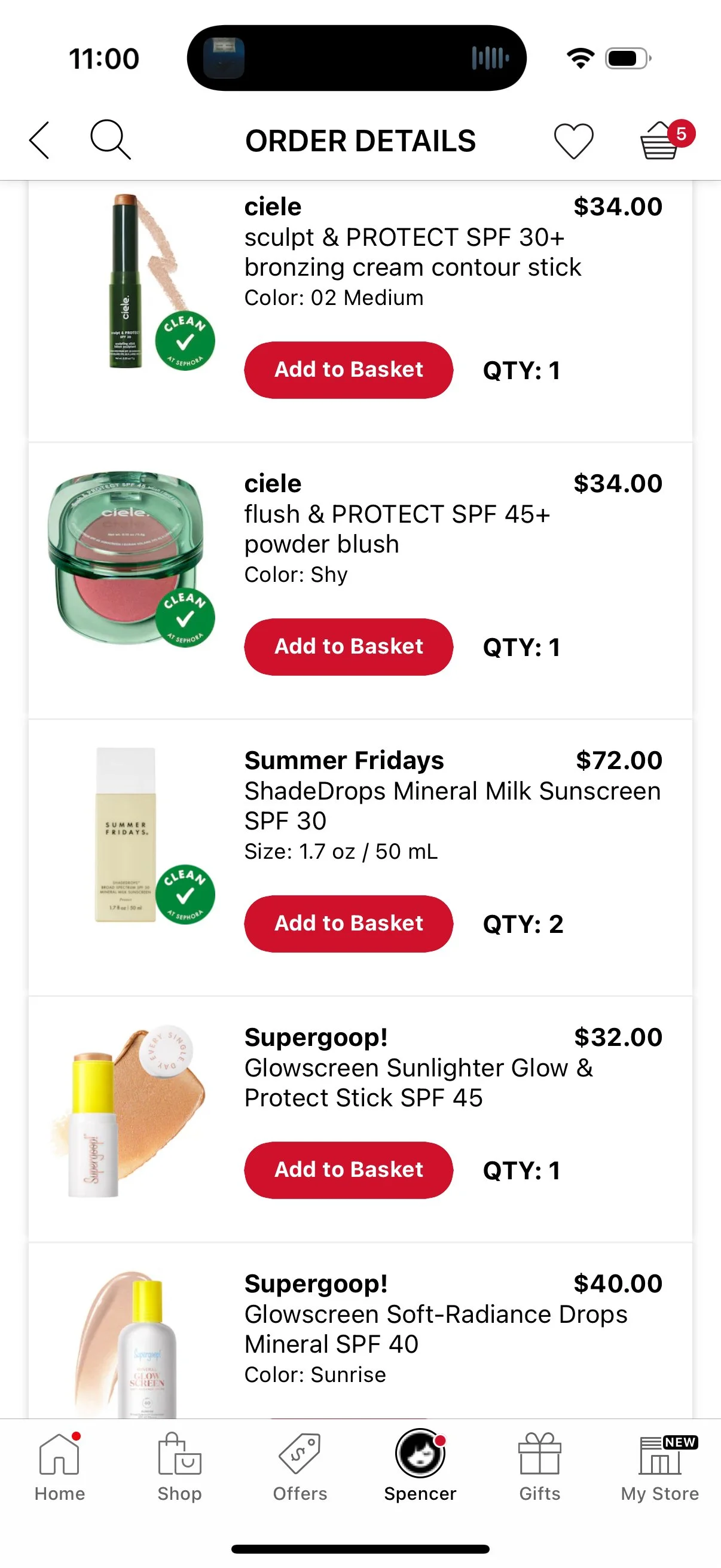
My personal hell is dealing piecemeal with FSA reimbursements. On a receipt of 6 items, I got 2 of them approved and reimbursed (Summer Fridays ShadeDrops SPF50, my absolute favorite daily SPF). The rest were rejected.

Thank you, Supergoop! for being so explicit about FSA eligibility.
So I went through all of my steps of screenshots of the PDP and circling SPF. And thankfully the Supergoop! website explicitly says that everything they sell is FSA and HSA eligible. So I submitted those receipts and got 2 more products (from Supergoop!) approved: Soft-Radiance Drops and Glowscreen Sunlighter.
The last two were a Ciele contour stick and blush. Still rejected. And at this point, the math is not even mathing on the receipt because the FSA administrator chose an arbitrary amount to reimburse for the first 2 items. Then they calculated another amount for the Supergoop! items. So now I am just asking for the total minus those 2 values.
The Sephora and Ciele PDPs both only say broad-spectrum SPF, but they do not explicitly say the word “sunscreen.” And that seems so silly… Did I really get rejected because it did not say it’s a sunscreen? Please.
That’s when I took photos of the actual product packaging, which says sunscreen on the front of the box. I also snapped some shots of the ingredient lists, which also say sunscreen. Circled the words in the pictures and submitted for reimbursement.
And what do you know? Approved.
It’s funny that this one reimbursement ran me through the entire gamut of what could go wrong. But at least it taught me valuable lessons of how to successfully get rejected FSA claims for sunscreen approved.
Don’t Be Afraid to Get FSA/HSA Items at Sephora
There’s 100% a solid rationale to get your products directly from the FSA store or use your FSA card at the merchant (something Sephora does not allow). But I want my Sephora status. And I want my silly little free samples from Sephora. So I will continue purchasing my sunscreen from Sephora on my personal credit card (plus I get the points back!) and reimbursing the expense at my FSA.
And if your FSA administrator gives you a hard time with your SPF expense, just remember:
SPF above 15
Photos of the product display page (PDP); circle the word “sunscreen”
Photos of the product; circle the word “sunscreen”
And most importantly, do not get discouraged. This is your money. Even if it was automatically taken out of your paycheck pre-tax. But it’s still yours! So go get it.
Note: this blog contains affiliate links, which cost you nothing but help this blog stay running.